Claude Code and Codex API Access: 3 Routes Compared on Cost and Setup
Every time you renew Claude Code or Codex, you’ve probably done the math: a $20/month Plus seat feels wasteful when you barely use it, and not enough when you use it a lot. Switch to official pay-per-token APIs and the bill has no ceiling. Self-host a gateway to pool your subscriptions and you’re staring at a VPS plus OAuth setup. Pick a cheap relay and your key sits on someone else’s server — with no real way to verify the model on the other end is what they claim.
I put the three routes you can actually take side by side: run CLIProxyAPI to turn your own CLI subscriptions into a compatible API; forward pay-per-use through a commercial relay like OpenRouter; or go straight to the model vendors’ official APIs. The short version up front: there is no best gateway, only a cost model that fits your usage curve. Heavy usage inside subscription limits usually favors self-hosted subscription pooling; light usage favors pay-as-you-go; the middle ground depends on whether you’ll babysit a VPS.
Scope first: this is about API supply for AI coding agents like Claude Code and Codex, not a general LLM gateway shootout. CLIProxyAPI pools CLI subscriptions — per its docs, supported upstreams include Codex, Claude Code, Gemini CLI, Grok, and others — and exposes OpenAI/Gemini/Claude/Codex-compatible endpoints. Comparing it to general-purpose gateways misses the point.
Align the cost lens first
I started from a feature table and quickly realized features can’t answer “where does the money go.” So the comparison axes became cost structure, setup difficulty, and data flow — the three things that actually bite you at decision time.
Version info matters for the conclusions too, since CLIProxyAPI ships fast. I learned to check GitHub releases and the Docker Hub image tag — both pointing at v8.0.27 (released 2026-10-12) is what counts; one side alone may show a cached page. Every version below is as of 2026-10-14; make it a habit to eyeball the Docker Hub tag before you start.
Self-hosted: subscriptions plus a VPS, fixed cost
Self-hosting is better estimated as a fixed cost, not “free API.” Roughly: $20/month for the subscription plus $5–10/month for a VPS, a flat monthly spend that gets cheaper per token the more you use. For anyone running an agent hard every day, this is usually the cheapest route.
The price is three things you carry yourself: the OAuth device-code flow, long-term VPS maintenance, and subscription-side risk controls. When I deployed in early October, the OAuth step hit Cloudflare 403s and regional timeouts — it turned out to be the subscription/network environment, not the gateway. I documented that deployment in detail, and the Docker plus client-config parts are copy-pasteable: routing Codex through CLIProxyAPI. But that’s the deal with self-hosting: when anything in the chain breaks at 2am, you’re the one fixing it.
A rough break-even sketch
At what usage does self-hosting beat pay-per-use? A back-of-the-envelope calc (assumptions stated, not a quote):
- Self-hosted fixed bill: $20/month subscription + $5/month entry VPS ≈ $25/month flat, same price whether you hammer it or not.
- Official pay-per-use bill: taking Sonnet 5.5 class pricing ($2 input / $10 output per million tokens, third-party compilation) — 1M input + 200K output a day ≈ $4/day, heading for ~$120 a month.
The break-even is obvious: at millions of tokens a day, self-hosting locks an open-ended bill into a fixed fee. Flip it around — if you open a terminal a few times a week, pay-per-use might cost single dollars a month, and self-hosting just saddles you with idle VPS rent. Pick your side.
Install test: v8.0.27, first try
I re-ran the full install on an isolated test box (Ubuntu 26.04, 1 vCPU / 1.9GB RAM), pinned to v8.0.27 — never latest:
docker pull eceasy/cli-proxy-api:v8.0.27 # 292MB, release page shows 2026-10-12Three lines of config is enough, and it boots with no upstream configured:
# config.yaml
config-version: 8
server:
  port: 8317
docker run -d --name cpa-test --restart unless-stopped \
-p 8317:8317 \
-v ./config.yaml:/CLIProxyAPI/config.yaml \
-v ./auths:/root/.cli-proxy-api \
eceasy/cli-proxy-api:v8.0.27The boot log confirmed version, commit, and build time (v8.0.27 / bf93416 / 2026-10-12), matching GitHub main. / returns 200 with the three compatible endpoints; /v1/models returns an empty list with no upstream configured — that’s the normal state, not an error.
Two findings from the test worth spelling out in any tutorial:
- No auth in the minimal config. Without
access.api-keys, anyone can hit your gateway. Fine on a private network; the moment the port faces the public internet, add a key first. - Inside a container, don’t use 127.0.0.1 for the host. I pointed the mock upstream at
http://127.0.0.1:18888and got connection refused — localhost inside the container is the container itself. Use the host’s Docker bridge address (usually 172.17.0.1) or--network host. To the gateway’s credit, its 500 spelled out the dial failure plainly, so debugging was quick.
Also: the /health endpoint doesn’t exist in my test config (404), so don’t copy generic health-check templates verbatim.
How slow is the gateway itself? Measured: ~4ms
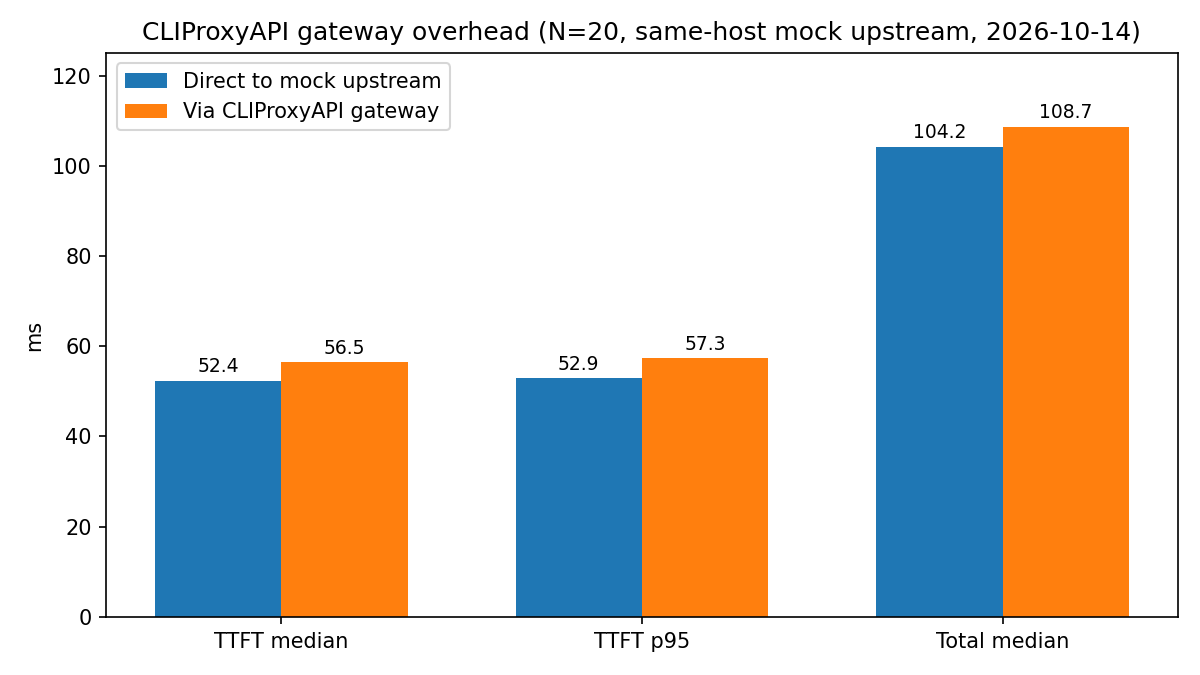
“Won’t self-hosting be slow?” is the most common objection, so I measured it. Method: spin up a mock OpenAI upstream on the same box (fixed 50ms delay on the first chunk), compare “direct to mock” vs “through the gateway to mock,” 20 runs each, streaming:
| Path | Success | TTFT median | TTFT p95 | Total median |
|---|---|---|---|---|
| Direct to mock upstream | 20/20 | 52.4ms | 52.9ms | 104.2ms |
| Via CLIProxyAPI gateway | 20/20 | 56.5ms | 57.3ms | 108.7ms |
The gateway itself adds about 4ms, and p95 sits right next to the median — the overhead is stable. This conclusion is scoped to the test conditions: same host, low load, mock upstream — the self-hosted gateway is not the bottleneck. When it feels slow, that’s usually model inference or the upstream network, not the extra hop. High-concurrency or complex network behavior wasn’t tested.
For reference, I ran 10 real model calls straight through a commercial relay I had on hand (OpenAI-compatible, gpt-6-luna — the relay’s own model label, fingerprint unverified): 10/10 succeeded, TTFT median 1240ms, p95 1996ms, total median 1745ms. First-token latency is dominated by model inference — which confirms the point above: 4ms of gateway overhead is noise in end-to-end feel.
Deployment itself is simple: once the container is up, the agent talks to it through the OpenAI-compatible address. Check your version’s docs for the exact endpoints and auth; the typical client shape looks like this (swap in your own service address):
from openai import OpenAI

client = OpenAI(
    base_url="https://your-api.example/v1",
    api_key="YOUR_API_KEY",
)
If you’d rather not start from scratch, I packaged the scripts I verified into a one-click deploy repo — setup.sh does it in one pass; set your key and the service is up:
kuangyongjie/cliproxyapi-codex-deploy
OpenRouter: less ops, pay per use
OpenRouter flips the cost logic: model tokens pass through at provider pricing with no markup; the platform charges at top-up time — 5.5% on card payments (minimum $0.80), 5% on crypto. I cross-checked this rate against three independent 2026-10 sources (betterclaw.io, leanroute.dev, calculatorai.app) and they agree; the official pricing page is authoritative, verified 2026-10-14 for this article. There’s also a BYOK mode: bring your own official key and the platform fee is waived within a $25,000/month list-price allowance, 5% beyond that (same caveat: official page wins).
Setup is the easiest of the three: sign up, top up, point the OpenAI SDK’s base_url at it, pick a model, go. Their docs confirm the OpenAI-compatible endpoint as a drop-in replacement — existing code barely changes:
from openai import OpenAI

client = OpenAI(
    base_url="https://openrouter.ai/api/v1",
    api_key="YOUR_OPENROUTER_API_KEY",
)

response = client.chat.completions.create(
    model="YOUR_MODEL",
    messages=[{"role": "user", "content": "Hello"}],
)
Skipping the ops has a price: requests travel through OpenRouter before reaching the upstream provider. By default the platform doesn’t store prompts or completions, only metadata, with opt-in logging — that’s the platform’s own default policy; the request still ends up at the upstream provider, under the provider’s own data policy. For data-sensitive teams, the question isn’t “do they store” — it’s “how many parties does my request pass through.” That holds for any commercial relay.
Be specific about relay risk, and keep evidence separate from judgment. One study flagged model-fingerprint mismatches among reseller relays, but I couldn’t independently verify the original — so no Chinese relay gets named here. The safer move: start with a small top-up, then check the returned model fingerprint and behavior against expectations; if it doesn’t match, switch. Any recommendation that only talks price and never mentions verification deserves skepticism.
Official APIs: the direct baseline
Official APIs are pay-per-use, straight from the model vendors, with the shortest data path. They’re the reference frame for the other two routes: every “X% cheaper” claim has its denominator here.
For OpenAI and Anthropic specifics I cite third-party compilations (2026-10) for ballpark comparison — but pricing pages change often, so re-check the official pricing page and Anthropic pricing before doing real math. Don’t bake a moving price into your long-term cost model.
Stability can be read from architecture before any benchmark numbers: self-hosting adds a single VPS point of failure you fix yourself; commercial platforms have routing and fallbacks (whether they kick in depends on the model and failure mode); official APIs are served directly by the vendor. Three sentences to choose: heavy usage, VPS skills, and tolerance for subscription risk — self-host; light or fluctuating usage with no ops appetite — OpenRouter; hard requirements on data path and direct connections — official API. This article doesn’t compare real-world uptime between the three; don’t treat an architecture sketch as an uptime promise.
Boundaries / what I didn’t test
Two things were actually measured: gateway overhead (same-host mock upstream, N=20, +4ms) and direct commercial-relay feel (my relay, gpt-6-luna, N=10). Not measured: OpenRouter or official API online latency (no keys for those), end-to-end OAuth-subscription upstream behavior (needs a browser device login), or anything beyond 24 hours of stability. The overhead number comes from a mock upstream — it proves “the gateway itself isn’t slow,” not “your upstream isn’t slow.”
CLIProxyAPI versions, OpenRouter fees, and official pricing can all move; everything above is verified as of 2026-10-14. Re-check the project release page, Docker Hub tags, and official pricing pages before you act.
Three sentences to decide
- Self-hosted pooling: heavy daily agent use, already hold CLI subscriptions, comfortable with basic Linux ops, want a locked-in cost ceiling.
- OpenRouter: small or spiky usage, no server babysitting, switching between models often to test.
- Official APIs: compliance requirements on the data path, budget to match, no concern about usage elasticity.
Related links: CLIProxyAPI project · one-click deploy repo · OpenRouter quickstart · OpenRouter pricing